After 9 months of responsible disclosure, I can finally write this up — a stored cross-site scripting (XSS) vulnerability in Office 365, originating from e-mail metadata two hops away from where it executed.
Overview
Reported to Microsoft in April 2017. Patched after ~9 months. Recognised in the Microsoft Hall of Fame for January 2018.
Discovery
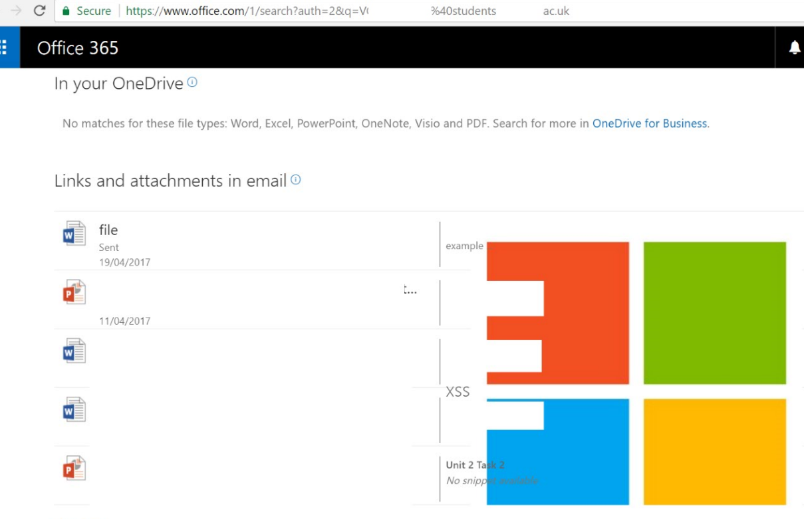
While browsing an EDU Office 365 account, I noticed a "shared with me" section displaying files received via e-mail — each with a subject and snippet pulled directly from the original message and rendered on the page.

Fuzzing & attack
These shared documents only appeared when an Office file (.docx, .xlsx, etc) was attached to a received e-mail. The injection surface was the e-mail subject — rendered unsanitised on the search results page.
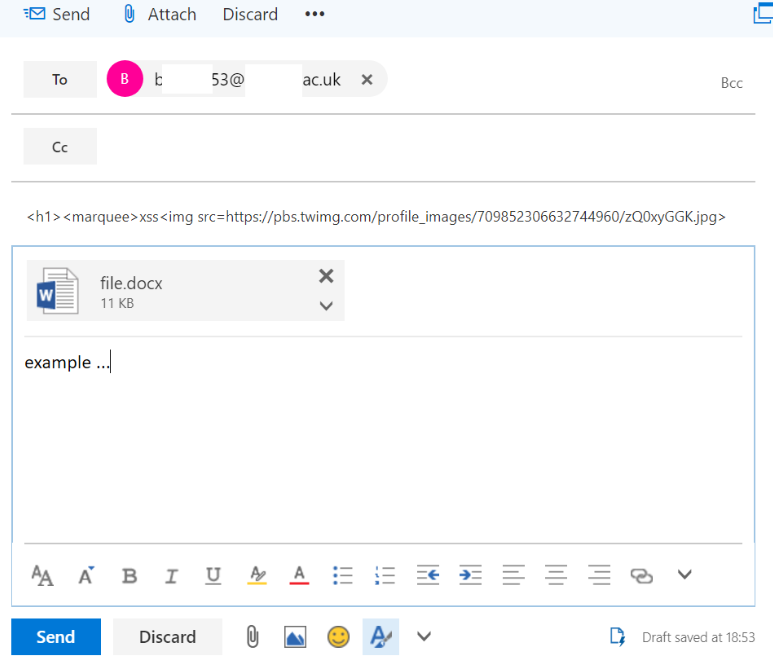
I sent an empty .docx to a test Office 365 account with the subject set to a simple payload:
Payload: <h1>XSS<img src=...>
It executed. Not just received in the shared files area — it ran in the browser as a stored XSS vector.
Impact
A .docx named "Assignment" or "Brief" forwarded to a student cohort would execute the payload in every recipient's browser. At scale, that's a mass account takeover vector. After patching, the payload renders as plain text rather than executing:

You can't automate your way to this kind of finding — the injection surface was e-mail metadata, two hops from the render point. Sanitise ALL foreign input, including API data and e-mail data. If it touches your page, it needs to be treated as untrusted.